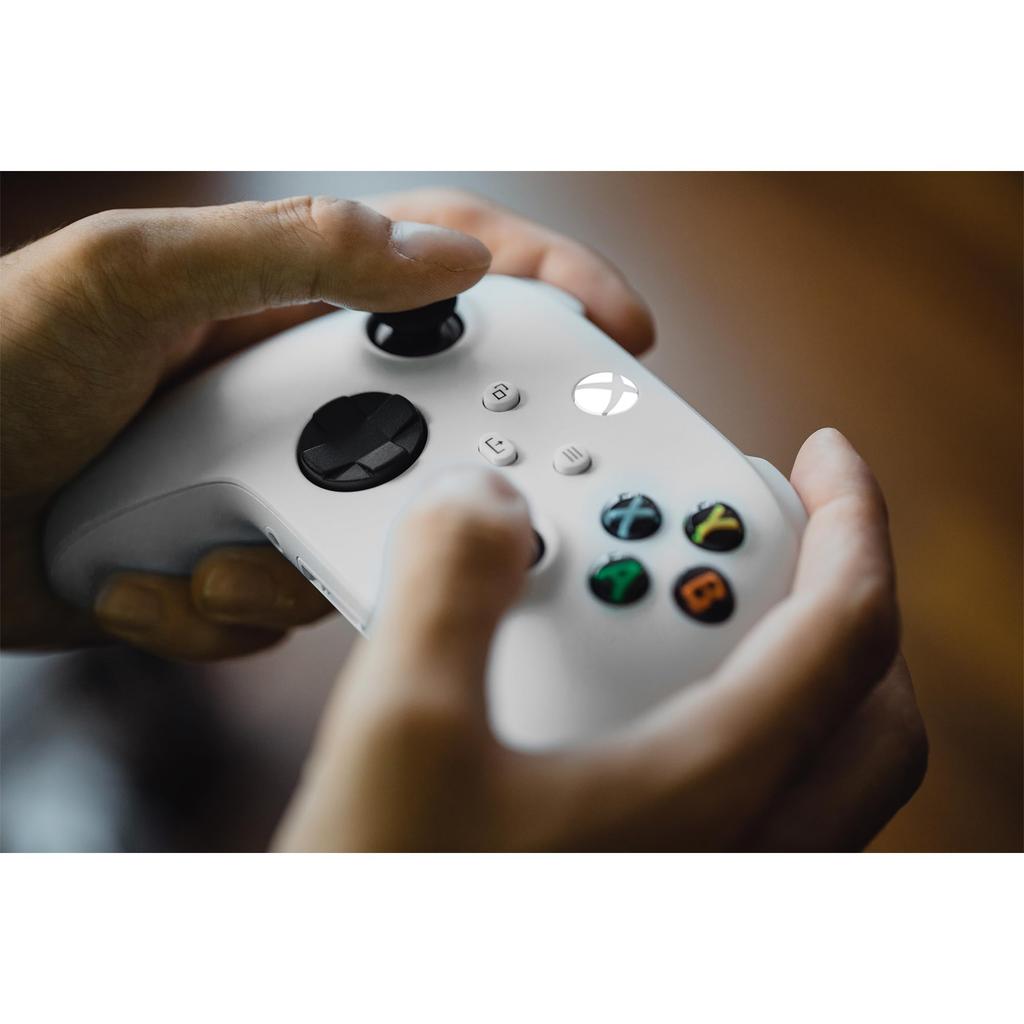
The Xbox Wireless Controller features a sleek design and a non-slip, easy-to-use finish, developed for a more comfortable gaming experience.
It features a hybrid directional pad for precise control and textured triggers, bumpers, and the back.
It also features a new Share button for instantly capturing and sharing your game screen.
You can use the Xbox Accessories app to configure button assignments and more.*
This product is compatible with Xbox Series X|S, Xbox One, Windows 10 PC, Android, and iOS.
You can connect headsets and other devices that support a 3.5mm audio jack directly to the console.*
Product Features
・More comfortable and easier to use
・Non-slip textured triggers, bumpers, and grips
・New hybrid D-pad for more precise control
・Share button for quick game capture and sharing
・Easily connect and switch between Xbox Series X|S, Xbox One, Windows 10/11 PC, Android, and iOS*
・Communicate with the console via Xbox Wireless or Bluetooth*
・Easily remap buttons using the Xbox Accessories app*
・Directly connect headsets with a 3.5mm stereo audio jack
*Feature support may vary by OS version. Some features are not available on Android or iOS devices via Bluetooth.
For more information, visit xbox.com/controller-compatibility.
The Xbox Accessories app, which allows button mapping, is compatible with Xbox Series X|S, Xbox One, and Windows 10/11.
Product Specifications
[Included Items] Xbox Wireless Controller (Robot White), (with 3.5mm stereo audio jack), AA battery (sample)
Model Number
QAS-00006
(C) 2022 Microsoft. Microsoft, the Microsoft logo, Windows, Xbox, Xbox One, the Xbox logo, and related logos are trademarks of Microsoft Corporation and/or its affiliates. The Bluetooth® word mark and logos are registered trademarks owned by Bluetooth SIG, Inc. and any use of such marks by Microsoft Corporation is under license.
[Included Items] Xbox Wireless Controller (Robot White), (with 3.5mm stereo audio jack), AA battery (sample)
This controller features a refined design and a non-slip, easy-to-use surface, designed for a more comfortable gaming experience.
This product allows you to configure button assignments and other settings using the Xbox Accessories app. It is compatible with Xbox Series X|S, Xbox One, Windows 10 PC, Android, and iOS. You can use it by connecting headsets that support a 3.5mm audio jack directly to the console.
Support for each feature may vary depending on the OS version. Some features are not available on Android or iOS devices via Bluetooth. For details, please visit xbox.com/controller-compatibility.
The Xbox Accessories app, which allows you to assign buttons, is compatible with Xbox Series X|S, Xbox One, and Windows 10/11.




![Bezdrátový ovladač Xbox [Originální produkt] (Robot bílý)](https://img.joomcdn.net/ccc6243c725f3cdda252de9f50b19591429b3896_100_79.jpeg)
![Bezdrátový ovladač Xbox [Originální produkt] (Robot bílý)](https://img.joomcdn.net/f85e2dd505140f97c0b3dbb3176462ec565c9299_100_79.jpeg)
![Bezdrátový ovladač Xbox [Originální produkt] (Robot bílý)](https://img.joomcdn.net/894e81a8d10e8c0e10b6d7ff9d046b9009214ddd_100_100.jpeg)
![Bezdrátový ovladač Xbox [Originální produkt] (Robot bílý)](https://img.joomcdn.net/f2ccb815676c2fbb096562284bf2eabcf79f3b24_100_100.jpeg)
![Bezdrátový ovladač Xbox [Originální produkt] (Robot bílý)](https://img.joomcdn.net/26cd919ea27f9bac24264f0185a045643339b3e1_100_56.jpeg)

![Bezdrátový ovladač Xbox Elite Series 2 Core Edition [Originální produkt] (Bílý)](https://img.joomcdn.net/c9e23e46b4964fe2d026edea1f0a11fe8022e0e6_100_100.jpeg)
![Bezdrátový ovladač Xbox Elite Series 2 Core Edition [Originální produkt] (Bílý)](https://img.joomcdn.net/8f28525951f5a6e8f0518f5809d6db442c8b0eef_100_100.jpeg)
![[Originální produkt] Bezdrátový ovladač Xbox Elite Series 2 Core Edition (Bílý)](https://img.joomcdn.net/990003c00edfce4f645b60d32bd96f1fb1aa8ebf_100_100.jpeg)
![[Originální produkt] Bezdrátový ovladač Xbox Elite Series 2 Core Edition (Bílý)](https://img.joomcdn.net/f91316354479d14fbe68cb0d139a38000991ef0b_100_100.jpeg)
![Bezdrátový ovladač Xbox [Originální produkt] (Saze)](https://img.joomcdn.net/aa1185a287cf51f40c80e2576217ff0545788e17_100_100.jpeg)
![[Originální produkt] Bezdrátový ovladač Xbox (Saze)](https://img.joomcdn.net/810f5de2faa907dc588f3de422676c95e07a382c_100_100.jpeg)